If you have ever completed the McDonald’s customer survey and wondered what the validation code is, where to find it, or what to do with it, this guide answers every question you have.
The McDVoice validation code is the most important part of the entire survey reward process, and it is the one thing most customers either lose, forget to write down, or misunderstand.
This article explains what the validation code is, where it comes from, how it differs from the survey code on your receipt, exactly how to get it in 2026,
Where to write it, and how to use it to claim your free McDonald’s reward. By the end, you will have no doubts about what to do at each stage of the process.
McDVoice Validation Code – At a Glance
What it is: A unique alphanumeric code generated after you complete the McDVoice survey
Where it appears: On-screen at the end of the survey at www.mcdvoice.com — displayed once only
Where to write it: In the printed box on your McDonald’s receipt (usually on the back or bottom)
What it does: Converts your receipt into a coupon for a free McDonald’s menu item
How long it is: Typically 4–8 alphanumeric characters (varies by location and campaign)
Expiry: Valid for 30 days from the date the survey is completed
Can you retrieve it? No — if you close the page before writing it down, it cannot be recovered
The McDVoice validation code is a short, unique code that McDonald’s generates for you personally at the end of the McDVoice customer satisfaction survey. It appears on your screen the moment you submit your survey responses at www.mcdvoice.com.
Think of it as the digital key that unlocks your physical coupon. On its own, your McDonald’s receipt only records your order. Once you complete the survey and write the validation code onto your receipt, that receipt becomes an accepted coupon for a free menu item at any participating McDonald’s location.
The validation code is different for every customer and every survey. It is generated uniquely for your session and cannot be reused, shared, or applied to a different receipt.
Validation code vs. survey code — what is the difference?
These two codes are frequently confused. Here is a clear comparison:
Term
What it is
Where to find it
When you use it
Survey Code
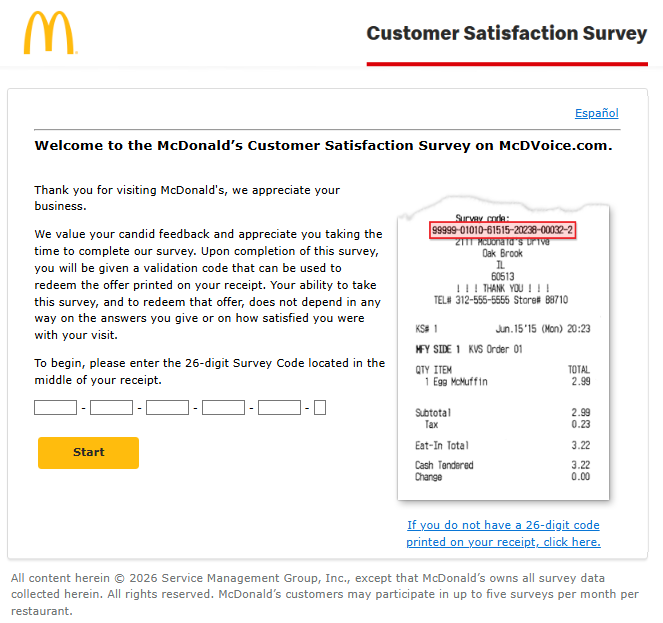
The 26-digit code already printed on your receipt before you visit the website
Bottom of your McDonald’s receipt, under ‘Survey Code’ or ‘Feedback Code’
You enter this code at the start of the survey to access it at mcdvoice.com
Validation Code
The short unique code generated after you complete the survey
Displayed on-screen at the end of the survey — one time only
You write this on your receipt and show it at McDonald’s to claim your free item
In summary: the survey code gets you into the survey; the validation code gets you your reward. You need both, in that order.
Where Does the Validation Code Come From?
The validation code is generated automatically by McDonald’s survey platform the moment you submit your completed survey at www.mcdvoice.com. It is not pre-printed on your receipt, not sent by email, and not available anywhere else. It exists only on the confirmation screen that appears directly after you click Submit.
McDonald’s generates a unique code for each completed survey to prevent fraud. Because the code is tied to a specific survey session and a specific receipt, it cannot be duplicated or guessed. This is why the code cannot be retrieved after you close the browser — McDonald’s does not store it in a customer-accessible database.
Why McDonald’s does not email you the validation code
The McDVoice survey does not ask for your email address, so there is no way for McDonald’s to send your validation code by email. The survey is designed to be anonymous — McDonald’s collects feedback data without linking it to individual customers. This is intentional. The trade-off is that the validation code is only shown once, so writing it down immediately is essential.
How to Get Your McDVoice Validation Code in 2026
Getting your validation code is a straightforward process. The steps below take approximately 5 minutes from start to finish.
1
Start with a valid McDonald’s receipt
You need a receipt from a qualifying McDonald’s visit made within the last 7 days. The receipt must have a survey code printed on it, along with the URL www.mcdvoice.com. If neither appears on your receipt, your location is not currently participating in the program.
2
Visit www.mcdvoice.com directly
Open your browser and navigate directly to www.mcdvoice.com. Do not use a search engine link — type the URL manually to ensure you land on the legitimate McDonald’s survey page. The real site has a clean interface showing the McDonald’s logo and a language selection prompt.
3
Choose English or Spanish
The survey is fully available in both English and Spanish. Select your preferred language on the opening screen and click the arrow or Start button to proceed.
4
Enter the 26-digit survey code from your receipt
Find the survey code near the bottom of your receipt and enter it carefully into the fields on screen. Double-check each digit before proceeding — commonly confused characters include 0 (zero) versus O (letter O), and 1 (one) versus I (letter I). Click Start when the code is entered.
5
Answer all survey questions
The survey contains between 10 and 15 questions about your visit. You will rate aspects including food quality, order accuracy, service speed, staff friendliness, and cleanliness. Answer each question honestly. McDonald’s uses this data to make real improvements. Do not skip any question or close the browser mid-survey.
6
Submit your responses
After answering every question, you will reach a final screen summarising your input. Click the Submit button to send your feedback to McDonald’s. This action triggers the generation of your unique validation code.
7
Write the validation code on your receipt — immediately
The validation code appears on your confirmation screen the moment you submit. Write it clearly in the designated box on your receipt before doing anything else. This is the single most important step in the entire process. The code is shown once and once only. If you close the page, navigate away, or your browser crashes before you write it down, the code is permanently lost.
Where Exactly to Write the Validation Code on Your Receipt
McDonald’s prints a dedicated space on every participating receipt specifically for the validation code. Here is how to locate it:
Flip your receipt over, or look at the very bottom of the front side
Find the box or line labelled ‘Validation Code,”Write Code Here,’ or similar wording
Write the code clearly in this space using a pen — not pencil
If there is no pre-printed box, write the code neatly near the survey URL at the bottom of the receipt
Write legibly. The cashier at McDonald’s needs to read the validation code to apply your reward. If the code is written unclearly, the cashier may not be able to process it and could refuse the coupon. Take 10 seconds to write it neatly.
What the 26-Digit Survey Code Looks Like on Your Receipt
XXXXX – XXXXX – XXXXX – XXXXX – XXXXX – X
The code is grouped into 5 blocks of 5 digits and one final digit, separated by dashes. Some receipts show the code as a continuous 26-digit number without dashes — both formats are accepted at www.mcdvoice.com.
Where to find it: Bottom of receipt, beneath the total, under a label that reads ‘Survey Code,”Feedback Code,’ or ‘Customer Satisfaction Survey.’
Validation Code Lifecycle – From Survey to Reward
Understanding the full timeline helps you avoid the most common mistakes that cause customers to lose their reward:
Timeline
What Happens
Day 0
You visit McDonald’s and receive your receipt with the survey code printed on it.
Day 1–7
Survey window is open. You must visit www.mcdvoice.com and complete the survey within 7 days of the purchase date on your receipt.
Survey Complete
Your unique validation code is generated and displayed on screen. Write it on your receipt immediately.
Day 1–30 (post-survey)
Redemption window is open. Bring your receipt with the written validation code to any participating McDonald’s.
Day 30 (post-survey)
Validation code expires. After this date, the coupon is no longer accepted at McDonald’s restaurants.
Key takeaway: There are two separate deadlines to keep in mind. The 7-day deadline applies to completing the survey. The 30-day deadline applies to redeeming the validation code at McDonald’s. Missing either deadline means losing your reward.
How to Use the Validation Code to Claim Your Free Item
Once you have written the validation code on your receipt, claiming your reward is simple:
Visit any participating McDonald’s within 30 days of completing the survey
Tell the cashier at the start of your order that you have a survey reward coupon
Hand over your original receipt with the validation code clearly written on it
The cashier reads the validation code and applies the free item to your order
Your free item is added to your order at no charge — enjoy your reward
What free item will you receive?
The specific reward is determined by the offer printed on your receipt before you take the survey. Common rewards in 2026 include a free medium fries, a free McFlurry, a free McDouble or McChicken sandwich, a free apple pie, or a Buy One Get One Free offer. The validation code unlocks whichever reward your receipt specifies — you cannot exchange it for a different item.
Validation Code Not Working? How to Fix It
If your validation code is being refused or not working at the restaurant, work through the following checks:
Issue
What to Check / Do
Code written unclearly
Ask the manager to inspect the receipt closely. Handwriting issues are the most common cause of refusal.
Coupon expired
Check the date you completed the survey. The validation code is only valid for 30 days after survey completion.
Wrong location
A small number of franchise locations do not participate in the McDVoice reward program. If your code is refused, try a different McDonald’s nearby.
Receipt too old
The survey window is 7 days from purchase. If you completed the survey more than 30 days ago, the validation code has expired.
Reward item substitution requested
The reward is fixed. You cannot swap a free fries coupon for a different item. If the exact item is unavailable, ask the manager for the nearest equivalent.
Code lost before being written
Unfortunately there is no recovery option. Contact McDonald’s customer service at 1-800-244-6227 — they may offer goodwill assistance in cases of documented technical issues.
Can You Recover a Lost Validation Code?
No — in almost all cases, a lost validation code cannot be recovered. McDonald’s does not store validation codes in a customer-accessible system after they are displayed. Once you close the browser or navigate away from the confirmation screen, the code is gone.
There is one exception worth trying: if you believe the code was not displayed due to a technical error on McDonald’s end (for example, the site crashed mid-submission or you received an error message), contact McDonald’s customer service at 1-800-244-6227. Provide them with your receipt details, the date and time of your survey attempt, and a description of the issue. In genuine technical fault cases, McDonald’s sometimes issues a replacement coupon as a goodwill gesture — but this is not guaranteed.
How to never lose your validation code — 3 simple habits
1. Have a pen ready before you start the survey. Do not begin the survey without something to write with. Searching for a pen after the code appears wastes precious seconds.
2. Take a photo of the screen as a backup. While the photo cannot be shown at the counter instead of the receipt, it gives you a reference to copy from if you cannot write quickly enough.
3. Do not multi-task during the final screen. Closing another tab or switching apps can cause your browser session to reset, hiding the confirmation page. Stay on the screen until the code is safely written.
Frequently Asked Questions
Q: How long is the McDVoice validation code?
A: The validation code is typically between 4 and 8 alphanumeric characters, though the exact format varies by McDonald’s location and promotional campaign. It will be clearly displayed in a large font on the confirmation screen so it is easy to read and copy.
Q: Is the validation code the same as the coupon?
A: Not exactly. The validation code is what you write on the receipt. The receipt with the code written on it becomes the coupon. You need both elements — the original receipt and the code written on it — for the cashier to apply your reward.
Q: Can I type the validation code into the McDonald’s app instead of using a physical receipt?
A: No. The McDVoice validation code is a physical receipt-based reward. It cannot be entered into the McDonald’s app or used for online or app-based orders. You must present the original receipt with the code written on it in person at the restaurant.
Q: My validation code has letters and numbers — is that normal?
A: Yes. Validation codes are alphanumeric, meaning they contain a mix of letters and numbers. When writing them down, be careful to distinguish between commonly confused characters such as O (letter) and 0 (zero), and I (letter) and 1 (number). Write each character clearly.
Q: Can two people use the same validation code?
A: No. Each validation code is unique to one receipt and one survey session. Attempting to use the same code twice, or copying someone else’s code onto your receipt, will result in the coupon being rejected at the counter.
Q: Do all McDonald’s locations accept the validation code?
A: Most do, but not all. McDonald’s locations that do not participate in the McDVoice program will not have the survey URL on their receipts in the first place, so you would not be able to earn a code there. However, a handful of participating locations may occasionally refuse codes due to staff training gaps — asking for the manager usually resolves this.
Q: Can I use the validation code at a McDonald’s in a different country?
A: Generally, no. McDVoice validation codes earned in the United States are intended for redemption at US McDonald’s locations. Canadian customers use a separate Canadian portal. If you travel internationally, your US validation code is unlikely to be accepted abroad.
Final Thoughts
The McDVoice validation code is a small detail with a meaningful payoff — a genuinely free McDonald’s menu item that requires nothing more than five minutes of honest feedback. The entire process hinges on one moment: the instant the code appears on your screen after you submit the survey.
Write it down. Have a pen ready before you start. Do not close the browser before the code is safely on your receipt. Everything else — the survey questions, the submission, the trip back to McDonald’s — is straightforward. The validation code is the one step where most people stumble, and now you know exactly how to handle it.
Keep your next McDonald’s receipt. Visit www.mcdvoice.com within 7 days. Write the validation code on the receipt the moment it appears. Redeem it within 30 days. Your free item is waiting.